Data/DIT calculator · free in CineMath
Data & Storage Calculator
Solve for file size, record time or bitrate, from codec presets or a camera's published data rates.
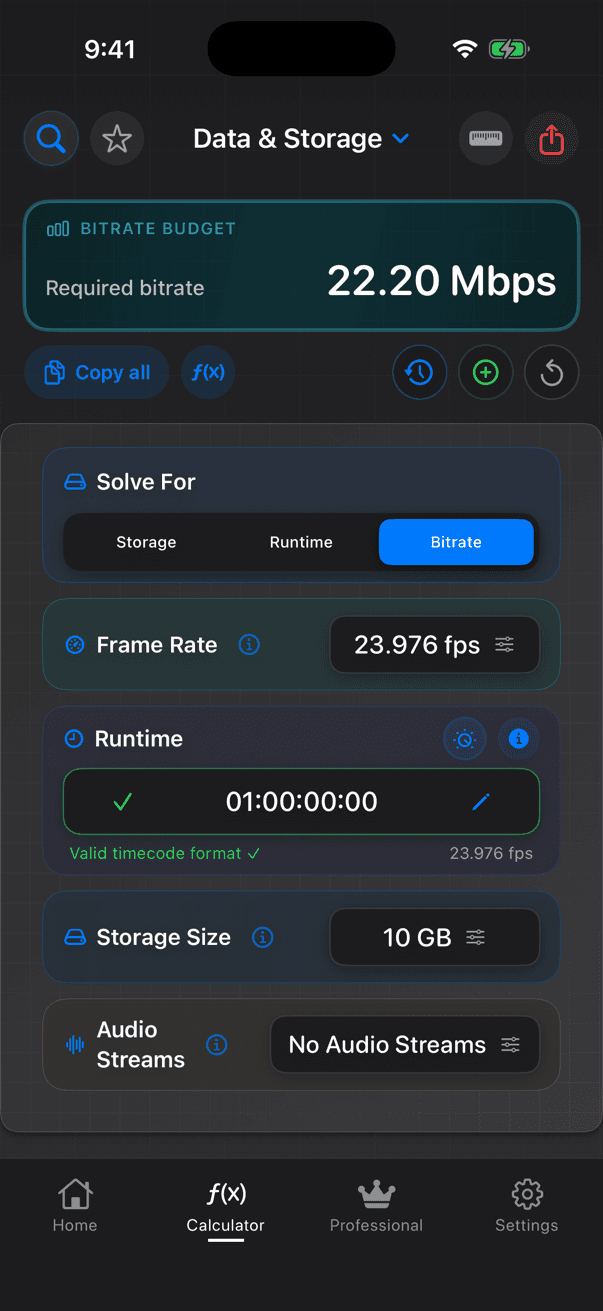
Data & Storage is three calculators in one. Solve for Storage (how big will it be?), Runtime (how long will this card or drive hold?) or Bitrate (what bitrate hits this file size?). It replaces the older Time to Data, Data to Time and Target Bitrate calculators.
Worked examples
| Solve for | Inputs | Result |
|---|---|---|
| Storage | 1 hour at 707 Mbps (UHD ProRes 422 HQ at 24p) | 318 GB |
| Runtime | 1 TB at 707 Mbps | 3 h 8 min 35 s |
| Bitrate | 5 GB file, 90 minutes | 7.41 Mbps (video plus audio) |
| Bitrate | 2 GB file, 30 minutes | 8.89 Mbps |
What you enter
- Solve For: Storage, Runtime or Bitrate
- Frame rate: 18 timebases from 23.976 to 240 fps, including drop-frame, or custom
- Data rate in Kbps, Mbps or Gbps: typed in, from 18 generic codec models (ProRes Proxy to 4444 XQ, DNxHD, DNxHR, H.264, H.265) with resolution, frame rate and audio, or from 24 quick presets
- Runtime (timecode), storage size (KB to TB) and audio streams, depending on the mode
What you get
- Storage: total size, plus the footprint per minute, per hour and per 10-hour shoot day
- Runtime: record time at the current rate, at half and at double the rate
- Bitrate: the bitrate required, split into video and audio when audio is included, and the closest codec preset
- Warnings for very large sizes and unusual bitrates
How CineMath works it out
- Size = bitrate × runtime ÷ 8 (1 GB = 8,000 megabits)
- Runtime = size × 8 ÷ bitrate
- Bitrate = size × 8 ÷ runtime, less the audio bitrate when audio is included
- Generic codec presets are estimates; camera presets use the maker's published rate for the chosen mode and frame rate
CineMath Professional: With CineMath Professional, the data-rate sheet also lists camera presets from the Camera Database: each camera's maker-published rate for the recording mode and frame rate you pick.
Guides
- How to Calculate BitrateBitrate from file size and duration, and the streaming bitrates platforms ask for.
- Video Storage PlanningGigabytes per hour by codec, footage from shooting ratio, backups, RAID capacity and transfer times.
- 4K ProductionUHD and DCI 4K, ProRes and raw data rates, storage per hour and transfer time.
- What Is a DCP?What a Digital Cinema Package contains, how big one is, SMPTE vs Interop and KDMs.
- HDR VideoPQ code values to nits, HLG, reference white, HDR metadata and HDR delivery.
- YouTube Video SpecsRecommended upload bitrates for SDR and HDR, Live encoder settings, Shorts, thumbnails, storage and upload time.
More guides (11)Fewer guides
- Film Festival DeliveryScreener and DCP specs from Sundance, Berlinale, Cannes and Venice, with size and upload math.
- Video Production FormulasCompression ratios, file sizes, streaming bitrates, scaling and audio loudness.
- TB vs TiBDecimal vs binary units, drive sizes in TiB, and keeping footage plans in one system.
- LTO Tape ArchivingLTO-7 to LTO-10 capacity and speed, tape counts, write time, LTFS and checksums.
- Camera Card SpeedsVPG and Video Speed Class, bitrate to card class, record time and offload time.
- Codecs for EditingProRes, DNxHR and H.264/HEVC compared: intraframe vs long-GOP, chroma, bit depth and GB per hour.
- Proxy WorkflowsProxy codecs and sizes, storage per hour, and relinking in Premiere Pro, Resolve, Final Cut Pro and Avid.
- Netflix Delivery SpecsApproved cameras, the App 2E IMF, Dolby Vision, the −27 LKFS mix and timed text rules.
- IMF Packages ExplainedAsset Map, PKL, CPL and track files, supplemental packages and the App 2E limits.
- Apple TV & Prime Video DeliveryProRes masters, HDR, audio, captions and artwork from Apple's and Amazon's public specs.
- Distribution DeliverablesA delivery schedule item by item: masters, sound, text, legal paperwork and publicity.